
Skip to content
English
  • There are no suggestions because the search field is empty.

New Year Checklist


Accessing New Year Checklist in Your Success Center

The New Year Checklist is a curated set of articles to guide you through the process of closing out one program year and starting a new one. You'll find a comprehensive list of all relevant articles below, sorted by the Impact Suite modules you may be invested in.

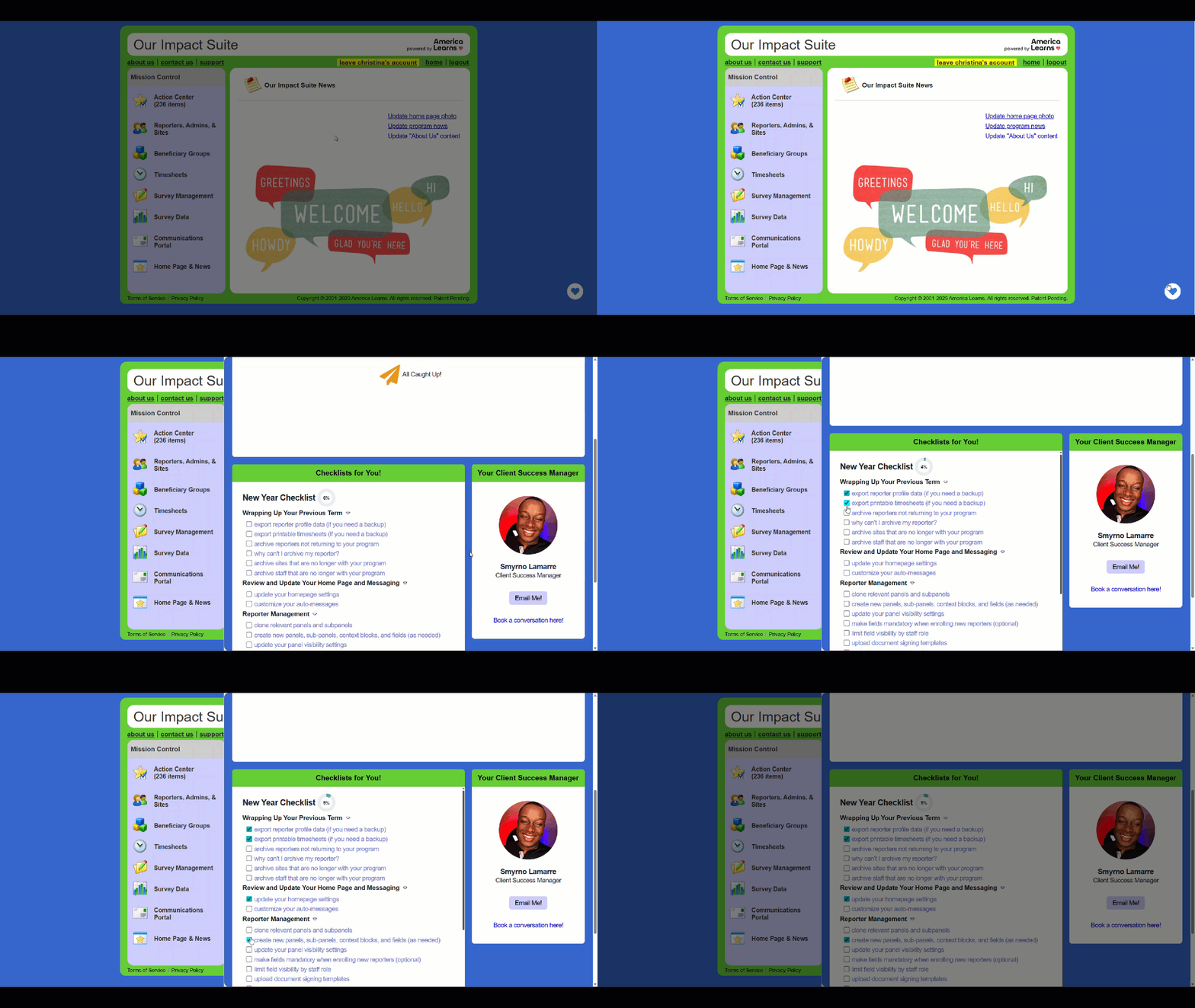
A more personalized and interactive version of this New Year Checklist can be found in your personal Success Center -- just click the blue heart icon in the bottom right corner of your screen:
f53N51iekTOY5HpxqLV1-Vlwjuf8hatO2g

The checklist in your Success Center is designed to help you access information easily and track your progress:

  • The list only features items from the America Learns modules you are currently invested in (Reporter Management, Timesheets, Surveys, Groups, and/or Financial Reporting)
  • Each list item leads directly to a helpful article from our Knowledge Base
  • You can check-off items that have been completed
  • Other team members with administrative access to your Impact Suite will see the checklist as well as the progress of any completed items

If you are not seeing the New Year Checklist in your Impact Suite, please reach out to support@americalearns.net.


Comprehensive New Year Checklist

The checklist below includes information for all Impact Suite modules (Reporter Management, Timesheets, Surveys, Groups, and Financial Reporting)

Wrapping Up Your Previous Term

ShLsUg8wqOkf3HAS5oDGtuAiY3w85s-8pg export reporter profile data (if you need a backup)
ShLsUg8wqOkf3HAS5oDGtuAiY3w85s-8pg export printable timesheets (if you need a backup)
ShLsUg8wqOkf3HAS5oDGtuAiY3w85s-8pg archive reporters not returning to your program
ShLsUg8wqOkf3HAS5oDGtuAiY3w85s-8pg why can't I archive my reporter?
ShLsUg8wqOkf3HAS5oDGtuAiY3w85s-8pg  archive sites that are no longer with your program
ShLsUg8wqOkf3HAS5oDGtuAiY3w85s-8pg archive admin that are no longer with your program

Review and Update Your Home Page and Messaging 

ShLsUg8wqOkf3HAS5oDGtuAiY3w85s-8pg update your homepage settings
ShLsUg8wqOkf3HAS5oDGtuAiY3w85s-8pg customize your auto-messages

Reporter Management

ShLsUg8wqOkf3HAS5oDGtuAiY3w85s-8pg clone relevant panels and subpanels
ShLsUg8wqOkf3HAS5oDGtuAiY3w85s-8pg create new panels, sub-panels, context blocks, and fields (as needed)
ShLsUg8wqOkf3HAS5oDGtuAiY3w85s-8pg update your panel visibility settings
ShLsUg8wqOkf3HAS5oDGtuAiY3w85s-8pg make fields mandatory when enrolling new reporters (optional)
ShLsUg8wqOkf3HAS5oDGtuAiY3w85s-8pg limit field visibility by admin role
ShLsUg8wqOkf3HAS5oDGtuAiY3w85s-8pg upload document signing templates (if using SignNow) 
ShLsUg8wqOkf3HAS5oDGtuAiY3w85s-8pg update type 1 association items
ShLsUg8wqOkf3HAS5oDGtuAiY3w85s-8pg enroll new reporters
ShLsUg8wqOkf3HAS5oDGtuAiY3w85s-8pg update returning reporter settings
ShLsUg8wqOkf3HAS5oDGtuAiY3w85s-8pg send welcome/password setup email to reporters
ShLsUg8wqOkf3HAS5oDGtuAiY3w85s-8pg export reporters to confirm they are connected to the right settings
ShLsUg8wqOkf3HAS5oDGtuAiY3w85s-8pg initiate reporter profile reviews by admin (optional)

Site Management 

ShLsUg8wqOkf3HAS5oDGtuAiY3w85s-8pg enroll new sites
ShLsUg8wqOkf3HAS5oDGtuAiY3w85s-8pg create or update site profiles (optional)

Admin Management

ShLsUg8wqOkf3HAS5oDGtuAiY3w85s-8pg create new or update existing admin roles
ShLsUg8wqOkf3HAS5oDGtuAiY3w85s-8pg enroll new admin accounts 
ShLsUg8wqOkf3HAS5oDGtuAiY3w85s-8pg create or update admin profiles (optional)

Timesheet Management

ShLsUg8wqOkf3HAS5oDGtuAiY3w85s-8pg clone your timesheet template
ShLsUg8wqOkf3HAS5oDGtuAiY3w85s-8pg add or remove timesheet positions
ShLsUg8wqOkf3HAS5oDGtuAiY3w85s-8pg ensure your timesheet template is up to date with current compliance recommendations (AmeriCorps)
ShLsUg8wqOkf3HAS5oDGtuAiY3w85s-8pg ensure your timesheet policy is up-to-date

Group Management

ShLsUg8wqOkf3HAS5oDGtuAiY3w85s-8pg using your current group again this year? archive identifiers
ShLsUg8wqOkf3HAS5oDGtuAiY3w85s-8pg need to create a new group this year? 
ShLsUg8wqOkf3HAS5oDGtuAiY3w85s-8pg need to clone a profile layout from a previous group?
ShLsUg8wqOkf3HAS5oDGtuAiY3w85s-8pg
check your group enrollment settings and instructions

Survey Creation, Management, and Scheduling

 
ShLsUg8wqOkf3HAS5oDGtuAiY3w85s-8pg  review question properties to ensure that settings are up to date
ShLsUg8wqOkf3HAS5oDGtuAiY3w85s-8pg
create new questions (optional)
ShLsUg8wqOkf3HAS5oDGtuAiY3w85s-8pg
create new forms (optional)
ShLsUg8wqOkf3HAS5oDGtuAiY3w85s-8pg add display logic to your forms (optional)
ShLsUg8wqOkf3HAS5oDGtuAiY3w85s-8pg schedule launches
ShLsUg8wqOkf3HAS5oDGtuAiY3w85s-8pg activate your reporters

Financial Reporting Management

ShLsUg8wqOkf3HAS5oDGtuAiY3w85s-8pg
 
enter your active prime federal codes
ShLsUg8wqOkf3HAS5oDGtuAiY3w85s-8pg create a new program year
ShLsUg8wqOkf3HAS5oDGtuAiY3w85s-8pg enter details for each program
ShLsUg8wqOkf3HAS5oDGtuAiY3w85s-8pg customize your automated e-mail notifications
ShLsUg8wqOkf3HAS5oDGtuAiY3w85s-8pg determine who will enter each program's budget

Plan for Success! 

ShLsUg8wqOkf3HAS5oDGtuAiY3w85s-8pg
 
impersonate a reporter to confirm your settings are correct