
Cloning a Panel or Sub-panel
Cloning a panel or sub-panel is a quick way to duplicate fields. Here are the steps.
To clone a panel:
-
On the left, in your Mission Control, select Groups.
-
Find the section called Manage Groups and use the drop-down to choose the group you’d like to work on.
- Find the panel you would like to clone and click this icon:

- A pop-window will appear.
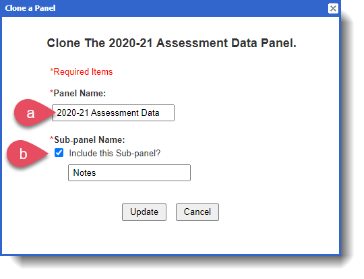
a) Give your cloned panel a new, unique name.
b) If there are any sub-panels within the panel, you'll have the option to clone those as well.
Here you can rename the sub-panels as needed. - Click Update.
Newly cloned panels will appear at the bottom of your profile management page. You can drag and drop these as you like.
To clone a sub-panel:
-
On the left, in your Mission Control, select Groups.
-
Find the section called Manage Groups and use the drop-down to choose the group you’d like to work on.
- Find the sub-panel you would like to clone and click this icon:

- A pop-window will appear.
a) First, use the drop-down menu to add cloned sub-panel to the panel of your choice.
b) Then, give your cloned sub-panel a name.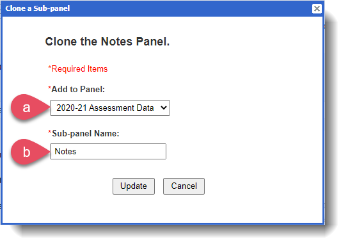
- Click Update.