
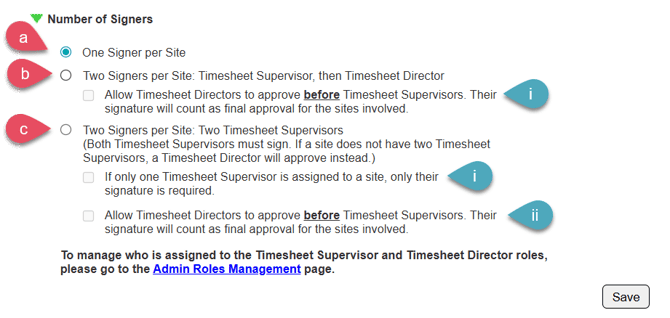
This section of the Timesheet Template controls how many signatures are required for each site on a timesheet.
NOTE: You can update these settings at any time by returning to your Timesheet Template management page. Changes to these settings will take effect immediately for any unsubmitted timesheets.
- On the left, in your Mission Control, click Timesheets.
- On the right, click Create & manage timesheet templates.
- Select the template that you’d like to edit.
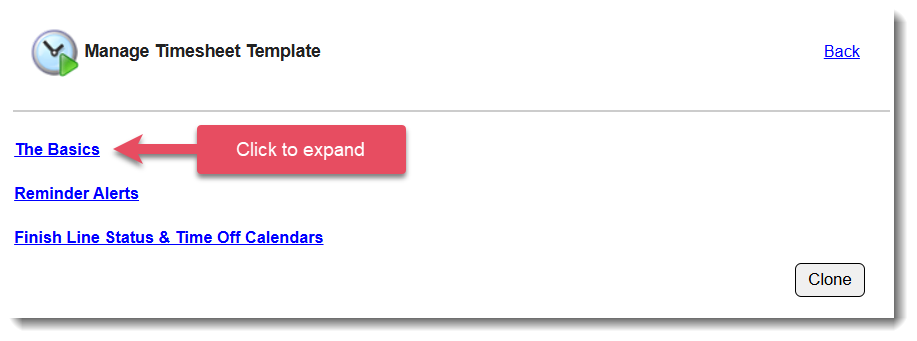
- Expand the section of the template called The Basics.
- In the section Number of Signers, click Edit.
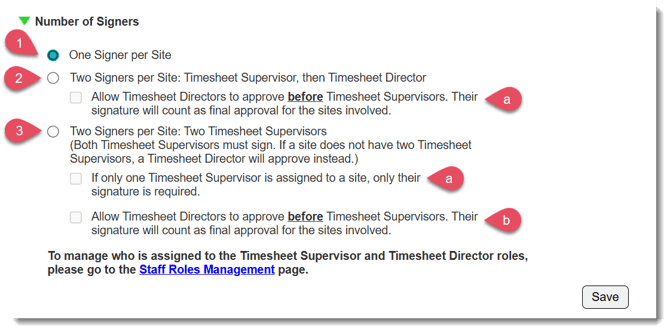
Here are more detailed descriptions of each of the three signing options:
-
- One Signer Per Site
For each site where a reporter served during a timesheet period, a Timesheet Supervisor must approve the hours.
If a Timesheet Director approves the timesheet before any Timesheet Supervisor has signed, the Director’s approval will serve as the final signature for all sites involved -- Timesheet Supervisors will no longer be able to sign. - Two Signers Per Site: Timesheet Supervisor, then Timesheet Director
For each site where a reporter served during a timesheet period, a Timesheet Supervisor must approve the hours. The Timesheet Director will sign after all required Supervisor approvals are completed.
If no Timesheet Supervisor is assigned to a site, the Timesheet Director must approve the hours for that site.
- Allow Timesheet Directors to approve before Timesheet Supervisors. Their signature will count as final approval for the sites involved.
Use this option with caution. When enabled, a Timesheet Director can approve a timesheet before any Timesheet Supervisor has signed. Once a Timesheet Director approves the timesheet, Timesheet Supervisors will no longer be able to sign, effectively bypassing their required approval.
- Allow Timesheet Directors to approve before Timesheet Supervisors. Their signature will count as final approval for the sites involved.
- Two Signers per Site: Two Timesheet Supervisors
For each site where a reporter served during a timesheet period, two Timesheet Supervisors must approve the hours. They can sign the timesheet in any order.
If no Timesheet Supervisor is assigned to a site, the Timesheet Director can serve as the second signature for that site.- If only one Timesheet Supervisor is assigned to a site, only their signature is required.
When enabled, the requirement for a second supervisor signature is bypassed. Only one Timesheet Supervisor signature will be required to fully approve this timesheet. - Allow Timesheet Directors to approve before Timesheet Supervisors. Their signature will count as final approval for the sites involved.
Use this option with caution. When enabled, a Timesheet Director can approve a timesheet before any Timesheet Supervisor has signed. Once a Timesheet Director approves the timesheet, Timesheet Supervisors will no longer be able to sign, effectively bypassing their required approval.
- If only one Timesheet Supervisor is assigned to a site, only their signature is required.
- One Signer Per Site
NOTE: To manage who serves as Timesheet Supervisor and Timesheet Director, update the relevant admin role permissions. For instructions, see this article.