
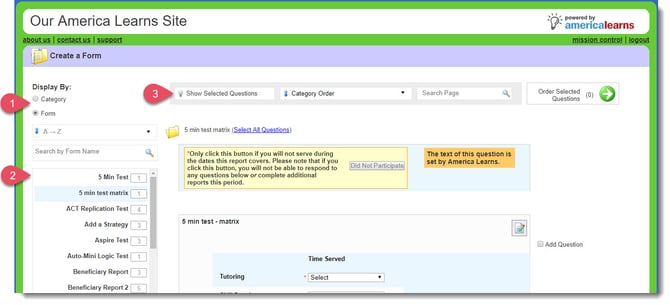
 The form creation page is made up of three sections:
- Display By Selector
- Category/Form Navigator
- Search and Show Bar
To Get to Creating Forms
- On the left, in your Mission Control, click Survey Management.
- On the right, click Create a new form. You’ll be taken to a new page that lists the categories your questions are organized under.
1. Display By Selector
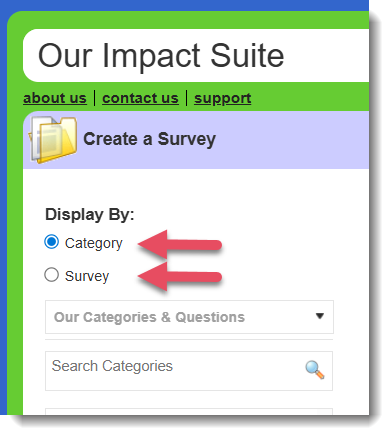
The “Display By” Selector allows you to choose questions from categories and existing forms.
- Category
When Category is selected, you will see your categories listed in alphabetical order. - Survey
When Survey is selected, you will see forms listed in alphabetical order.
2. Category/Form Navigator
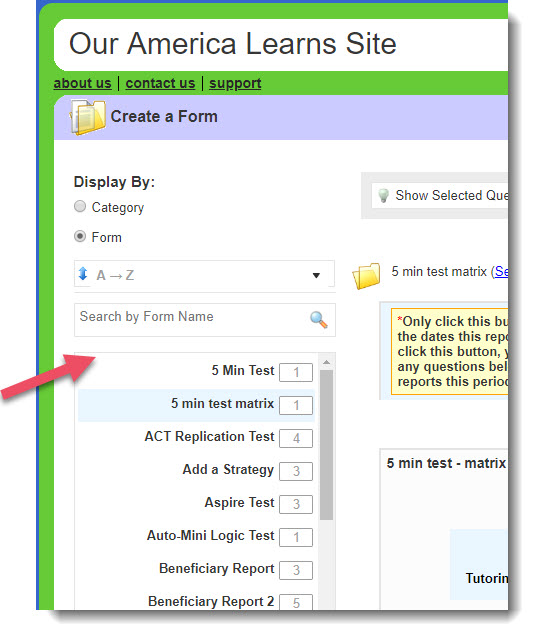
When toggled to Display By: Survey, you’ll be able to sort forms in the following ways:
| Drop-down Menu Option | Option Description |
| A - Z | Shows all forms in alpha-numeric order |
| Z - A | Shows all forms in reverse alpha-numeric order |
| Date Created: Newest First & Oldest First | Orders forms based on their creation date |
| Recently Used | Shows the 15 most recently used forms |
3. Search and Show Bar
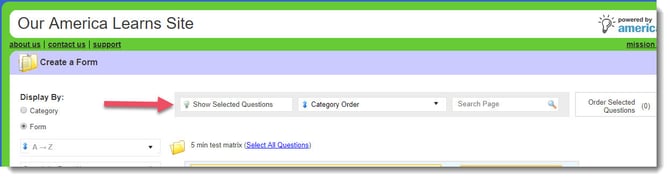
The Search and Show Bar allows you to filter the questions you want to see and select. There are three options in the bar:
- Show Selected Questions
- Category Order
- Search Page
- a. Show Selected Questions
Once you have selected one or more questions to include in your current form, you can use the Show Selected Questions option to show only the questions you’ve added. - b. Category Order
This option allows you to filter and sort displayed questions in a number of ways.
Drop-down Menu Options Option Description Category Order (Default) Displays categories in alphabetical order Date Created: Oldest First Displays questions ordered by the date they were created, oldest first. Date Created: Newest First Displays questions ordered by the date they were created, newest first. Date Last Used: Oldest First Displays questions ordered by the last date used, oldest first. Date Last Used: Newest First Displays questions ordered by the last date used, newest first. Number of Responses: Highest First Displays questions ordered by the number of responses that have been recorded for it, highest first. Number of Responses: Lowest First Displays questions ordered by the number of responses that have been recorded for it, lowest first. - c. Search Page
This option allows you to find questions from the category or form you selected in the Navigator.- Type a word, part of a word, or phrase in the search bar:

- For example: searching “ameri” will return the results such as “AmeriCorps”, “America Learns”, “Mesoamerican”, and “United States of America”.
- Type a word, part of a word, or phrase in the search bar: