
(Financial Reporting for Commission Admin)
Financial Reporting: Assigning Reporters and Viewers
In order for individuals to submit financial reports, you will need to assign them to the appropriate grant year. Before you can do this you will need to create an account for each reporter and assign them their site.
Then, follow these steps to connect them to financial reporting:
- On the left-hand side of your Mission Control, click Financial Reporting.
- Select the program year you’d like to access and click Go.
- Click on the link with the program's name.
- Open the panel called Program Enrollment Details and click the Edit link.
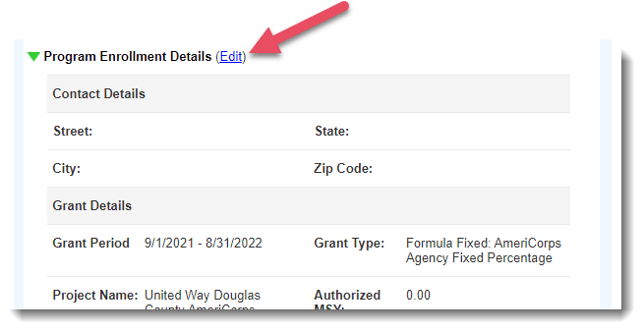
- In the pop-up window, open the Responsible Subgrantee Team Reporters panel.
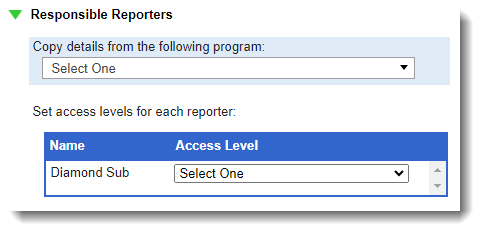
- Next, you'll see a list of folks who are assigned to site. Use the drop-down menu to choose either:
- Submit and View Budgets & Reports, or
- View Submitted Budgets & Reports.
- Click Save to update with your changes.