

The Completion Tracker
When you need to review which of your Fellows have and haven't completed forms, start by heading to the Fellow Impact Suite, then:
-
On the left, in your Mission Control, click Form Data.
-
On the right, under Individual Fellow Data, click Completion Tracker.
-
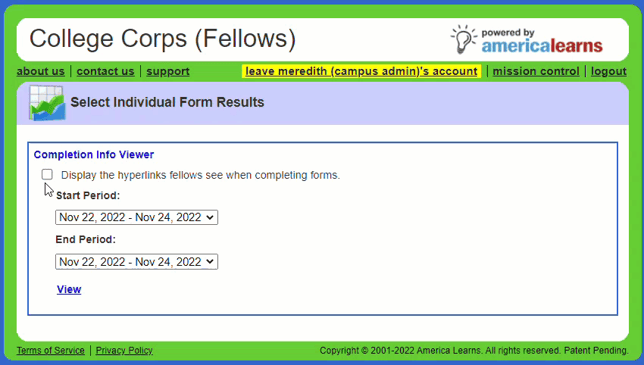
Check the box next to Display the hyperlinks fellows see when completing forms. This will allow you to choose the correct period from the drop-down menu.
-
After selecting a Start Period and End Period, click View.
-
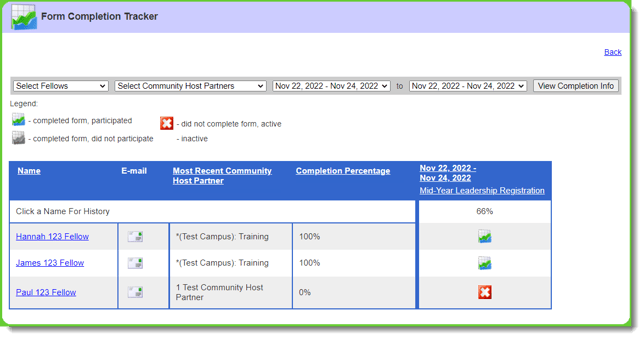
When the report opens, you'll be able to see who has and hasn't completed the form.
Communicating with Fellows Who Did Not Complete Required Forms
When you need to communicate with Fellows who haven't completed the required forms, start by heading to the Fellow Impact Suite, then:
-
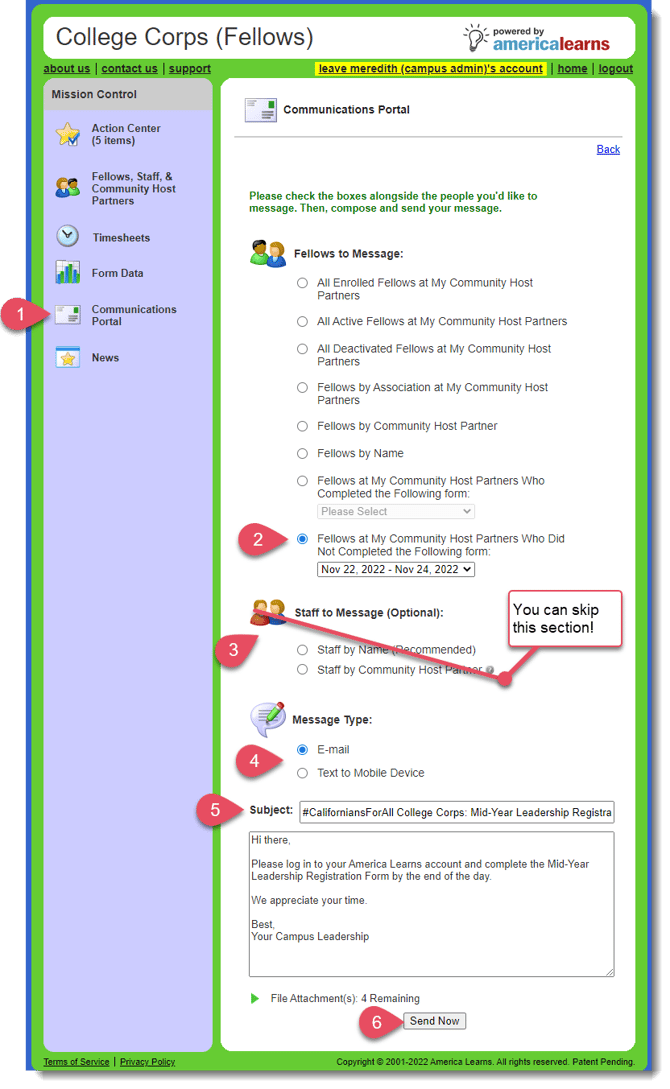
On the left, in your Mission Control, click Communications Portal.
-
Under Fellows to Message, use the option Fellows at My Community Host Partners Who Did Not Complete the Following Form.
-
You can skip the Staff to Message section.
-
Select E-mail or Text to Mobile Device.
-
Enter a Subject and write your message.
-
Click Send Now.