
Accompaniment & Teleservice Communications Tracking
To stay compliant with CNCS regulations, you can ask select reporters to share accompaniment and/or teleservice communications details in your timesheets. These details will be saved in the timesheet's Audit Trail.
IMPORTANT: When we talk about "teleservice communications", we're talking about tracking how reporters are communicating with supervisors throughout a given timesheet period, not daily hours and communications tracking. If you're looking to track daily teleservice hours and communications, please create one or more subcategories. Additional guidance for that is here.
Setting Up the Feature
The America Learns Support Team will need to enable these features for you. Please complete the form found here and we’ll have everything updated for you within one business day (call us if you need it updated faster: 310.693.6698).
Activating the Feature for a Reporter
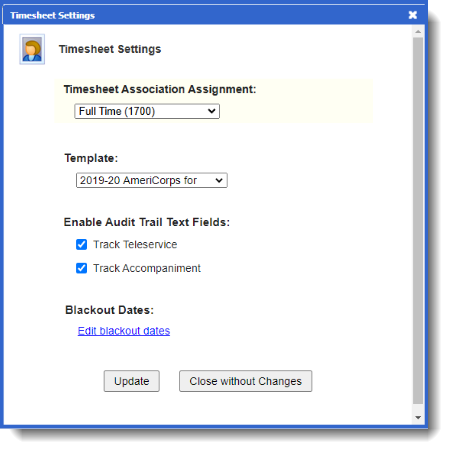
Once we've enabled the feature for your Impact Suite, in a reporter's Timesheet Settings panel, open the settings box and click the Audit Trail Text Fields you need.
You can also mass-update these settings either through the Reporter Export tool's Report Preview section, or by importing an Excel file with the necessary updates. Read those details here.
How Reporters Will Enter these Details
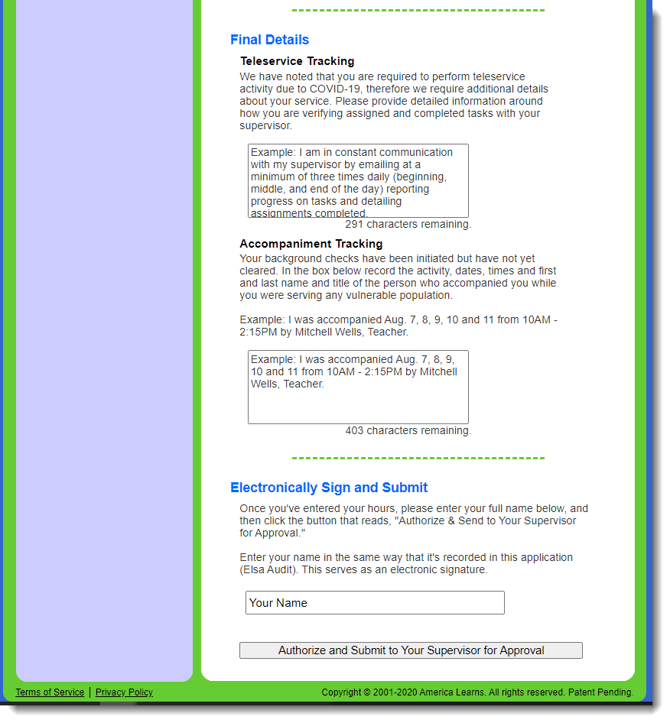
When you customize and activate either of these special text fields for a given reporter, a "Final Details" section will appear just above the signature area of the sheet for the reporter at issue.
What the Audit Trail Will Look Like
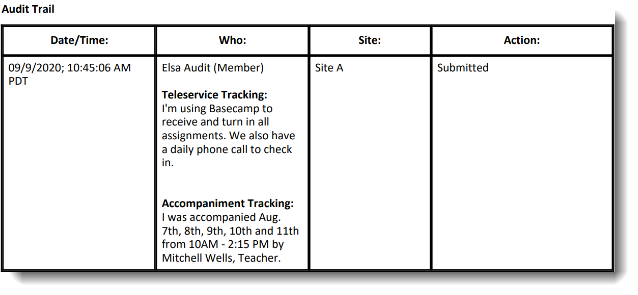
Here’s what the submitted Teleservice and Accompaniment data look like in the audit trail of the screening pages and in exported PDFs (check out the "Who" column):
Bonus: Track Any Two Types of Notes
These fields can be used for any type of notes you need, so if you need them for a reason other than Accompaniment and Teleservice, just complete the customization form or call us.