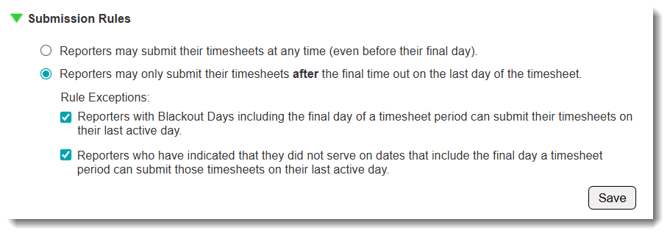
The Submission Rules section of your timesheet template allows you to set the rules around when a reporter can submit their timesheet
Follow these steps to update the submission rules:
- On the left, in your Mission Control, click Timesheets.
- On the right, click Create & manage timesheet templates.
- Select the template that you’d like to edit.
- Expand the section of the template called The Basics.
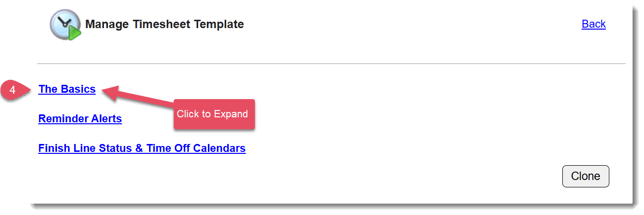
- In the section Submission Rules, click Edit.
- You'll see two options
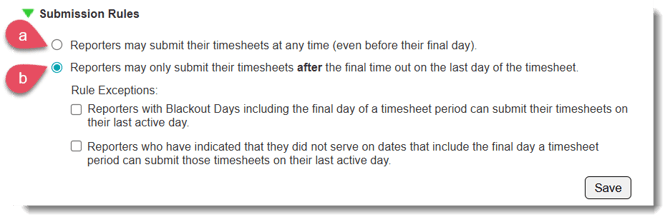
- Reporters may submit their timesheets at any time (even before their final day)
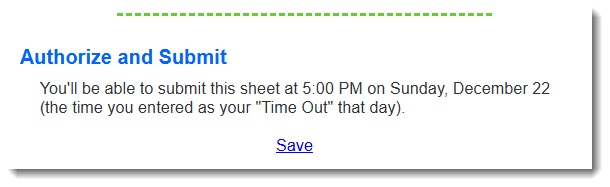
- Reporters may only submit their timesheets after the final time out on the last day of the timesheet - if this option is selected, reporters will see the following message when they try to sign and submit their timesheet:
- Reporters may submit their timesheets at any time (even before their final day)
- Click Save.
NOTE: Edits to submission rules take effect immediately for any unsubmitted timesheets.
WARNING (Compliance): Some programs (e.g. AmeriCorps) require that reporters do not submit timesheets before they have finished serving for that time period. For these programs, these settings are recommended: