
This section of the Timesheet Template lets you set up reminder messages that prompt Timsheet Supervisors and/or Directors to screen timesheets pending their review.
To update a your timesheet's reminder messages, follow these steps:
- On the left, in your Mission Control, click Timesheets.
- On the right, click Create & manage timesheet templates.
- Select the template that you’d like to edit.
- Expand the section of the template called Reminder Alerts.
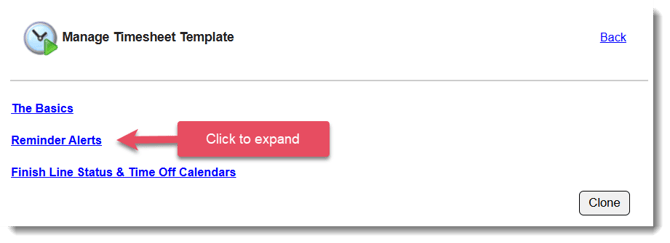
- In the section Reminder Alerts to Timesheet Supervisors and Timesheet Directors, click Edit.
- There are two types of timesheet reminder alerts for Timesheet Directors and Supervisors:
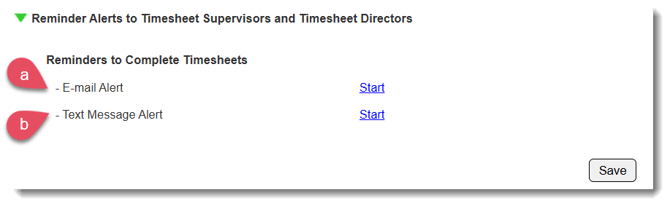
- Email Alert - Email alerts will be sent from donotreply@americalearns.net.
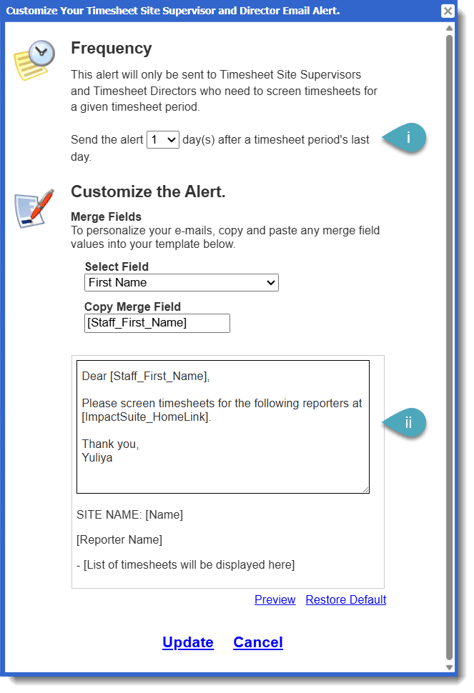
- You can choose how many days after the timesheet period closes the supervisor or director receives an email.
- You can customize the text of the email.
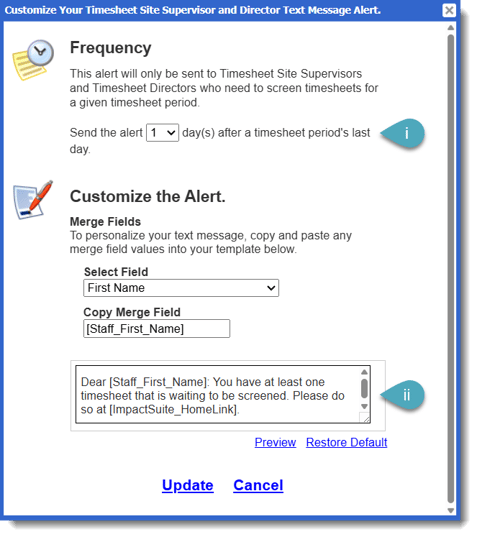
- Text Message Alert - a Timesheet Supervisor/Director has to be opted-in to text message alerts in order to receive these reminders.
-
- You can choose how many days after the timesheet period closes the supervisor or director receives a text.
- You can customize the text of the message.
- Email Alert - Email alerts will be sent from donotreply@americalearns.net.
- Click Update to save any changes.
NOTE: Updates made to the timesheet alert settings will take effect immediately.