
Scheduled Launches – Action Options
To access and update any launched or scheduled forms:
- On the left, in your Mission Control, click Report Management.
- On the right, click Manage existing & scheduled launches.
- Open your Scheduled Launches by clicking on the green triangle.
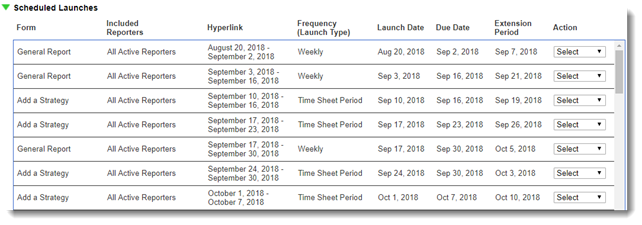
Actions available for Scheduled Launches include:
- Edit Launch
If you select a launch with frequency other than "One Time", the system will prompt you to decide if you want to edit just the select launch or all of the launches in the series. Either selection will open the launching page.
From here you can edit many of the launch details, or if no one has submitted data you can permanently delete the launch.
Note: You cannot change the Form. If you need to choose a different form, use the Clone functionality, and then Permanently Cancel This Report. - View Form
The form will open in a new tab for your review. - Clone
Use this option to clone the details from this launch to another. This is particularly useful if you need to change the form but wish to keep the other launch details. - Delete
Use this option to delete the launch of this form. If any frequency beyond One Time is selected, then you will have the choice to delete only this launch or delete this and future launches in this series.