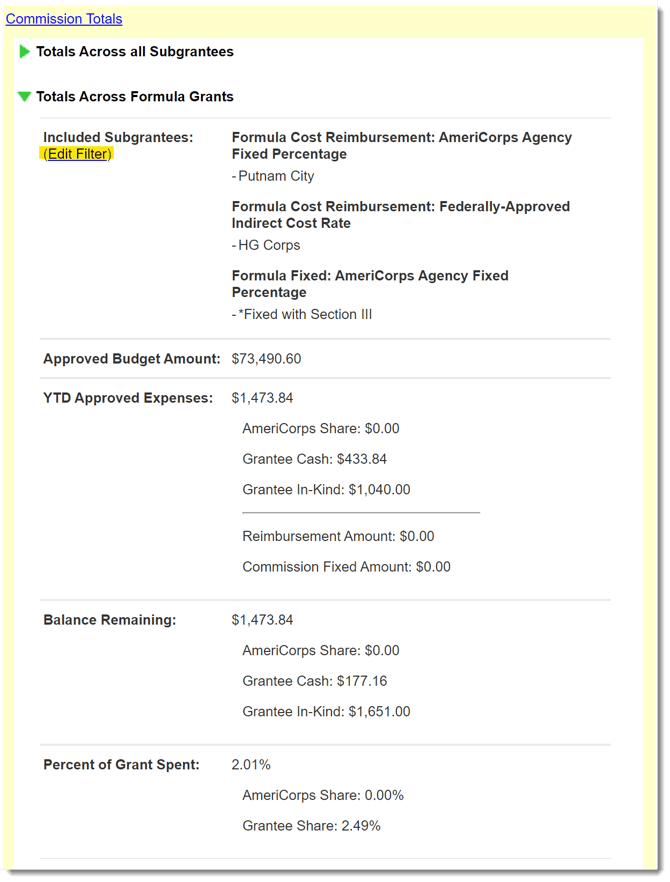
You now have the ability to generate portfolio-wide metrics from your Financial Reporting Dashboard, providing you with instant insights into what’s happening across any group of subgrantees during a given program year.
Using the Feature
To access the feature, open a program year dashboard for any grant cycle by:
- On the left of your Mission Control, click Financial Reporting.
- On the right, select the program year to access.
- On the program year dashboard, the first radio button is selected by default: Order Alphabetically. This needs to be selected in order to use the new feature.
- In the middle of the page, above the list of subgrantees, you’ll see a panel called [Your Commission Name] Totals. Click the panel to see your options.
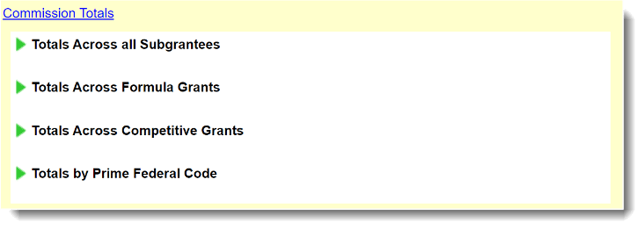
As depicted above, you’ll see at least three options:
- The ability to see year-to-date totals across all subgrantees.
- The ability to see year-to-date totals across subgrantees of each main grant type that’s active for the program year you’ve selected (EG, Competitive Grants, Formula Grants, Volunteer Generation Fund Grants), and
- The ability to see year-to-date totals by Prime Federal Code.
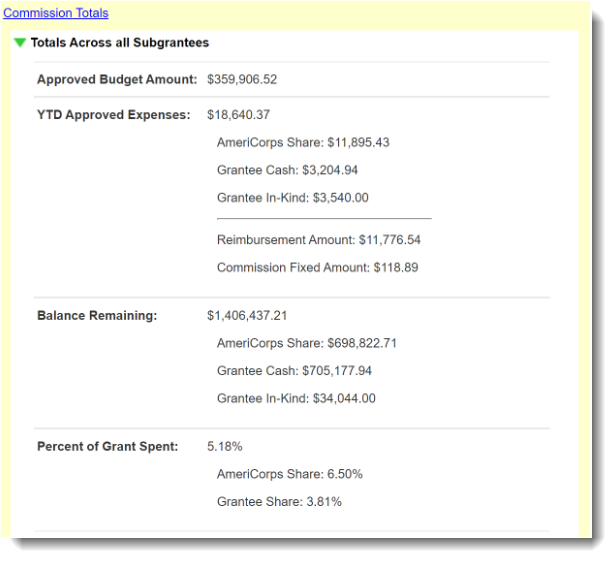
When you open up any subpanel, you’ll see the information displayed in the following screenshot for all of the subgrantees in the relevant category.
IMPORTANT: The displayed metrics only take approved budgets, budget modification, and expense reports into account.
For all sections except Totals Across all Subgrantees, once the metrics are visible, you can filter the list of included subgrantees by clicking the Add Filter link that’s highlighted in the screenshot below.
Across from the Add Filter link, you’ll see a list of subgrantees that are included in the filter.