
Reviewing Reporter Assignment History
For Reporters: you can review a record of identifier assignments (match/pair history) on the Reporter Profile.
To find it:
- On the left, in your Mission Control, click Reporters, Admin, & Sites.
- On the right, click Manage reporter accounts.
- Click on any reporter.
- Scroll to the panel called Associations & Groups.
- Here you can add new Type 1 or 2 Associations, and/or connect the reporter to Group identifiers by clicking the Edit button for the appropriate subpanel.
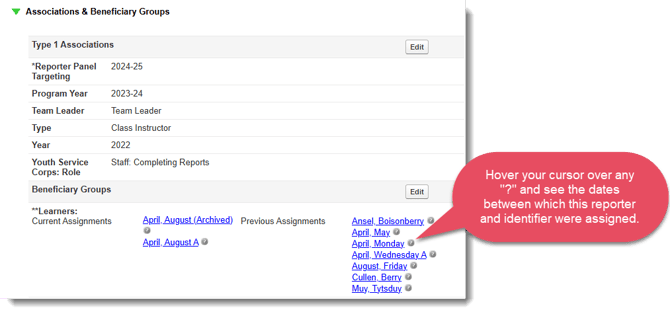
- Additionally, this panel will keep a history of all of the current and previous Group Identifier assignments. Like this:
For Identifiers: you can review a record of identifier assignments (match/pair history) on the Identifier Profile.
To find it:
- On the left-hand side of your Mission Control, click Reporters, Admin, & Sites.
- On the right, click Manage reporter accounts.
- On the right, use the More drop-down menu to and select Export Roster.
- Next, choose (a) how you’d like to organize your roster and then (b) click the Select Fields to Include button.
- Open the Associations & Groups panel and select the fields you’d like to review. Like this:
Reviewing Reporter Assignment History
As you select them notice that they will appear in the table at the bottom of your screen.
If you would like to include the assignment dates click the Add Dates links.