
Returning or Rejecting Timesheets after Approval
There may be times when you or a member of your team will need to reject a timesheet after it has been approved.
Here’s what to do:
- On the left, in your Mission Control, click Reporters, Admins, & Sites.
- On the right, click Manage reporter accounts.
- Click on the name of the reporter you would like to update.
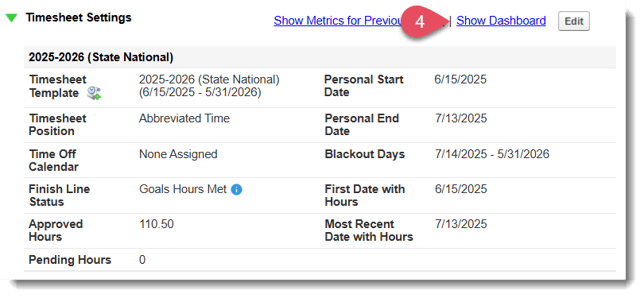
- Open the Timesheet Settings panel and click Show Dashboard.
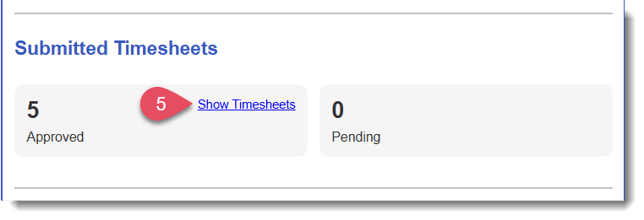
- Under the section Submitted Timesheets, click the link to Show Timesheets.
- Click on the specific timesheet you need to return.
- Scroll to the bottom section labeled Action, and select “I do not approve this time sheet for the following reasons.”
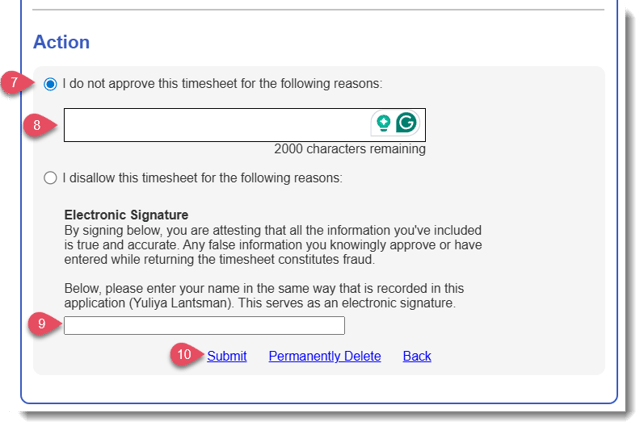
- In the text box, describe the specific reasons for returning the sheet. The reporter will see this text and will use it to figure out what they need to correct.
- Enter your name at the bottom of the page.
- Click Submit.