
Restoring Admin Accounts in Bulk
To restore accounts, follow these steps:
- On the left, in your Mission Control, click Reporters, Admins, & Sites.
- On the right, click Manage admin accounts.
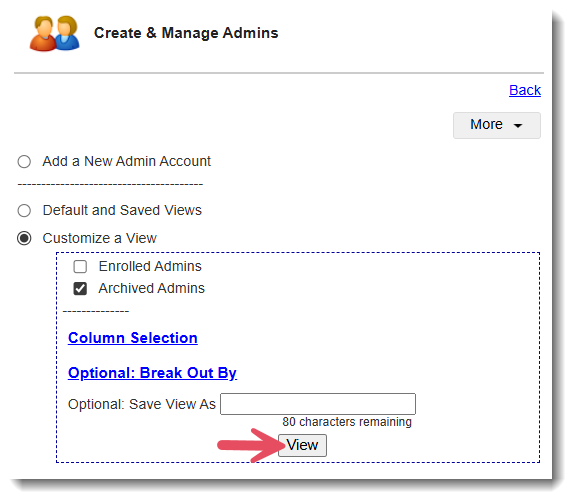
- Use the Customize a View section near the top of the page to select Archived Admins and click View.
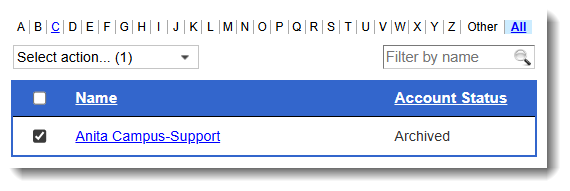
- Select the check-boxes alongside those admins whose accounts you’d like to reactivate.
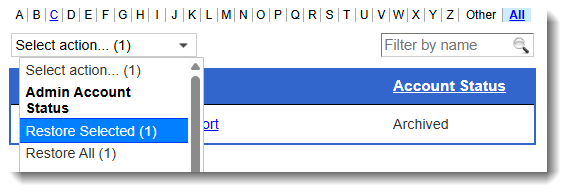
- In the Select action drop-down menu at the top, select the appropriate option Restore Selected.
Restoring Individual Accounts
- On the left, in your Mission Control, click Reporters, Admins, & Sites.
- On the right, click Manage admin accounts.
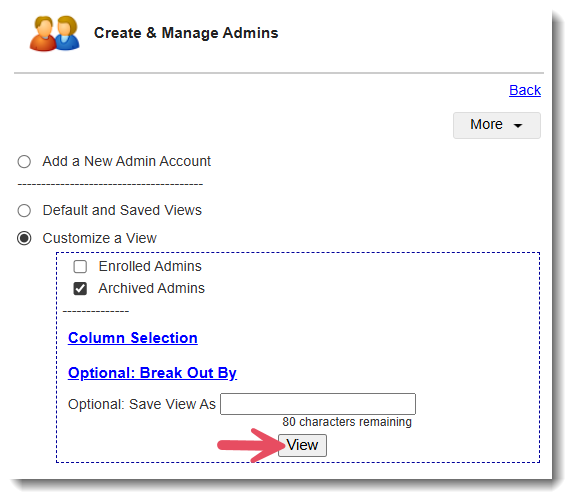
- Use the Customize a View section near the top of the page to select Archived Admins and click View.
- Click on the name of the individual admin reporter you would like to activate or archive.
- Archiving or Restoring Admins. To archive or restore an account. Just click this icon:

- Deleting Admins. If there is no data connected to an account, you can delete it at any time by clicking this icon:

- Archiving or Restoring Admins. To archive or restore an account. Just click this icon: