Preview Mode
If you'd like to preview one of your forms follow these steps:
- On the left, in your Mission Control, click Survey Management.
- On the right, click Manage forms.
- Select the form to see it in Preview Mode.
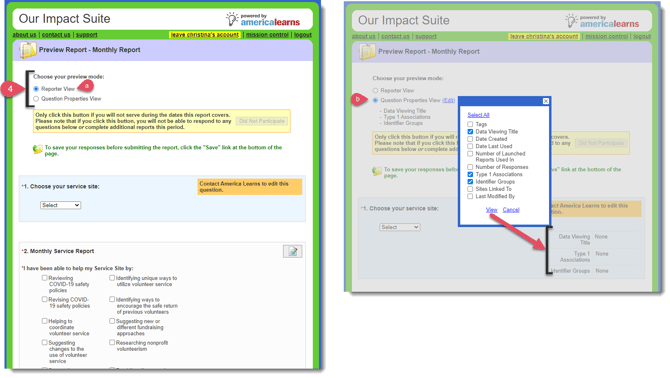
- You can view the survey in two ways:
- Reporter View (this will show you what the survey looks like from the Reporter's point of view).
- Question Properties View (include properties and information about the questions on your form)
- Reporter View (this will show you what the survey looks like from the Reporter's point of view).
NOT SHOWN IN PREVIEW MODE:
- Group questions will duplicate (with the identifier in a pink bar) for each identifier to whom the reporter is assigned.
- Reporters will only see questions that are not assigned to any site or type 1 association or assigned to their site and type 1 associations.
Editing Questions from Preview Mode
You can edit questions from Preview Mode by following these steps:
- On the left, in your Mission Control, click Survey Management.
- On the right, click Manage forms.
- Select the form to see it in Preview Mode.
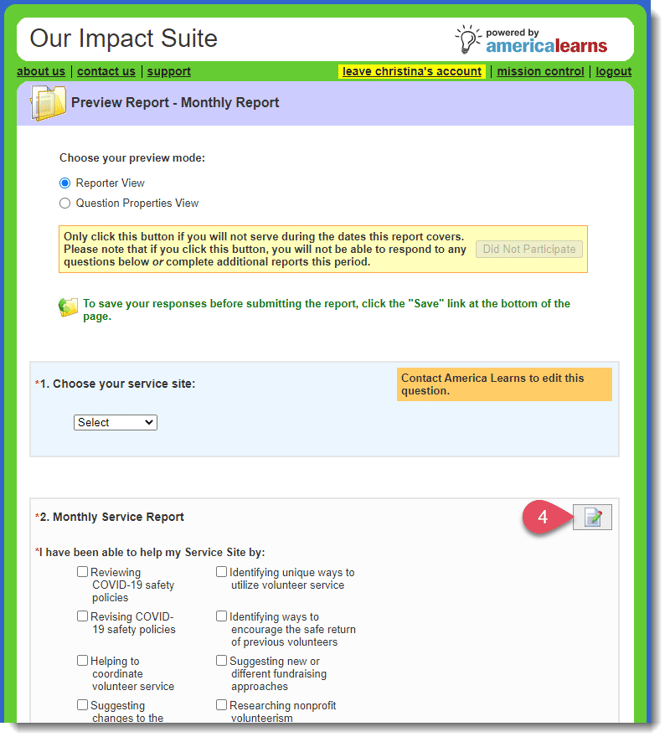
- To edit any question, click this Edit button. The question will open in a new tab in your browser.