
When You Need to Approve a Timesheet Before the Supervisor Does
For timesheet templates that require two timesheet signers:
- One Timesheet Supervisor and one Timesheet Director
- OR Two Timesheet Supervisors
If your timesheet template requires two levels of approval, you’ll normally follow that flow for every submitted timesheet.
But sometimes, life happens.
Maybe both Supervisors are on vacation the same week and no one’s available to review the timesheet. Or perhaps a Director bounced a timesheet back for a small edit and now needs to re-approve it quickly — but the Supervisor isn’t around to sign again.
For those situations, we’ve built in an emergency option that allows a Timesheet Director to approve a timesheet before the Supervisor does. This setting overrides the standard two-step flow and finalizes the timesheet with just the Director’s signature.
This article walks you through how and when to use that option — and why we recommend turning it off as soon as you're done.
Temporarily Allowing the Director to Sign Without Supervisor Approval
IMPORTANT: This setting should only be turned on when absolutely necessary. While it's active, any timesheet approved by a Director before the Supervisor will be considered fully approved — no additional signature will be required.
We strongly recommend turning this feature on only when needed and off immediately afterward to maintain the integrity of your standard approval process.
To update a template, follow these steps:
- On the left, in your Mission Control, click Timesheets.
- On the right, click Create & manage timesheet templates.
- At the bottom, select the template that you’d like to update.
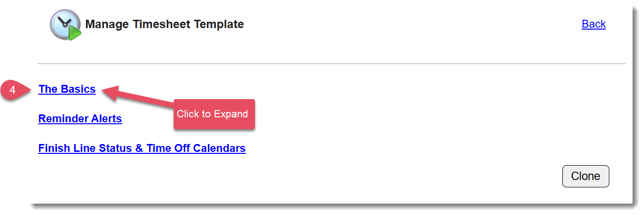
- Expand the section of the template called The Basics.
- Find the section called Number of Signers
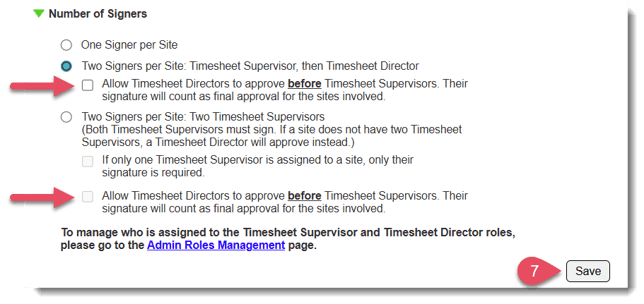
- Check this box to enable the feature that will allow Timesheet Directors to sign before Timesheet Supervisor approval.
- Click Save.
Why It’s Important to Turn This Feature Off Right After Use
While this feature is helpful in a pinch, leaving it on can create confusion or lead to approvals that don’t follow your intended workflow.
Here’s why we strongly recommend turning it off immediately after use:
-
It overrides your standard two-step approval process. Once enabled, a Director’s signature finalizes the timesheet — even if the Supervisor hasn’t reviewed it.
-
It increases the risk of missing key reviews. Supervisors may assume their approval is still required, even though the system has already marked the timesheet as complete.
-
It can lead to inconsistent practices. Using this setting as part of your regular workflow may cause miscommunication or weaken your checks and balances.
To keep your process clean and transparent, only enable this feature when truly necessary — and disable it as soon as you’re done.