
Managing Field Settings in Bulk
To manage and edit fields, use this link:
- On the left, in your Mission Control, click Reporters, Admins, & Sites.
- On the right, click Manage reporter accounts.
- On the right, use the More drop-down menu and select Manage Fields and Profile Layout.
- On the top-right, click Manage Fields.
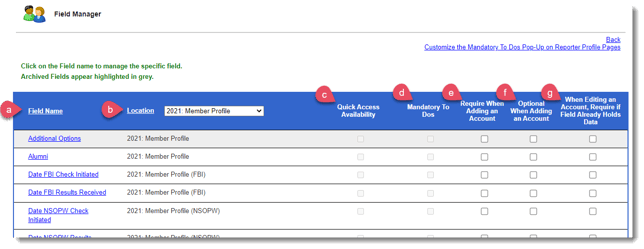
- The table that appears is dynamic and can be organized in the following ways:
- (a) By Field Name - In the header row, click 'Field Name', and field will be order in alphabetical or reversed alphabetical order.
- (b) By Location - You can view by Active Archived, Active Only, Archived Only, or by Panel.
- The table also allows you to make updates to some of the access and privacy settings:
- Add to reporter's (c) Quick Access and (d) Mandatory To Do list,
- (e) Require or (f) make fields optional when creating new reporter accounts, and
- (g) When editing an account, require the field already hold data.
- You can edit fields from this space by clicking on any field name.
Remember to click Update if you make any changes here.