Access the Individual Reporter Data Export
1. On the left, in your Mission Control, click Survey Data.
2. On the right, under Additional Reports, click Individual data viewer.
Step 1: What would you like to do?
In this step choose to view data on-screen, export data to Excel, or export data to CSV.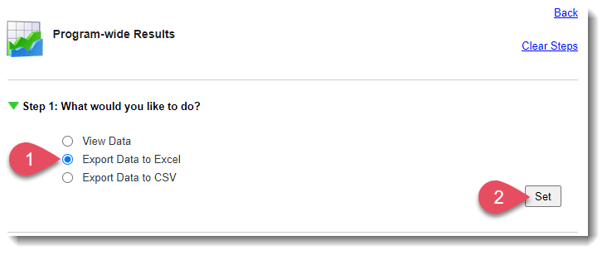
- Choose Export Data to Excel.
- To move to the next step, click Set.
(Need to View Data on-screen? Check out this article. Need to Export Data to CSV? Check out this article.)
Step 2: Select Reporter
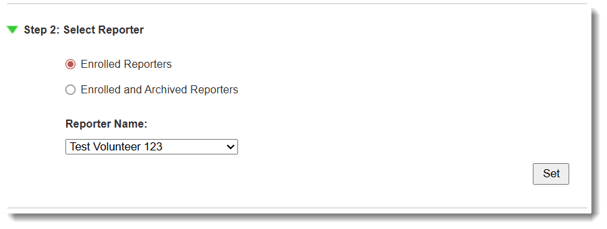
- Choose either Enrolled Reporters or Enrolled and Archived Reporters.
- Use the drop-down menu to select a reporter.
- To move to the next step, click Set.
Step 3: Select a Date Range
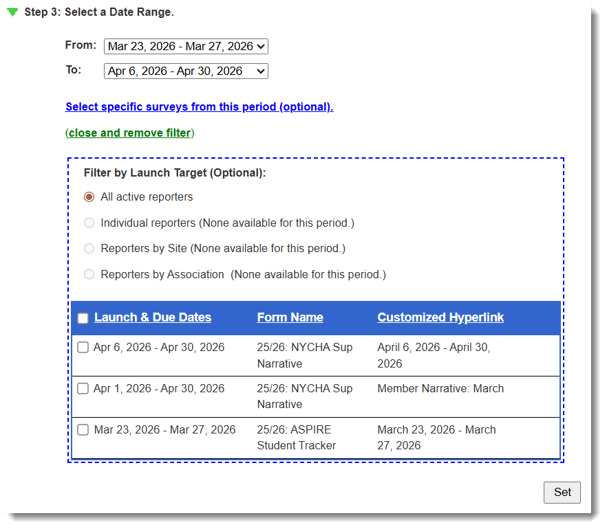
- Use the drop-down menus to select your start (From) and end dates (To).
- If you need to export data from specific reports during a given period of time, enter that time in the To and From menus, and then select the specific reports by clicking Select specific reports from this period (optional).
- To move to the next step, click Set.
Step 4: Export Options
Here's where you'll tell the application how to format your data in the spreadsheet. You can use pre-formatted templates, export raw data, or select a saved option that someone in your organization has already created.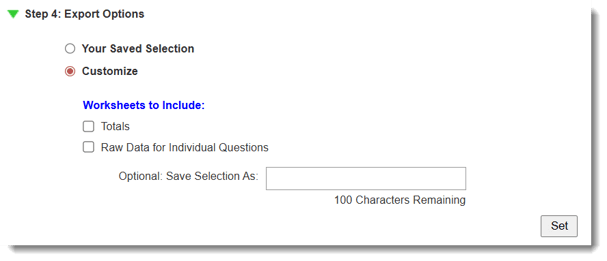
- Options:
- Use a Saved Export Option: Includes previously-saved formats, if any.
-
- Customize: Pick and choose from the available worksheets and options.
- Totals
- Raw Data
- Totals
- Customize: Pick and choose from the available worksheets and options.
- Click Set to save your selections.
- Once each step has a green check-mark, click Export to Excel.
- A window will appear showing you the progress of the export.
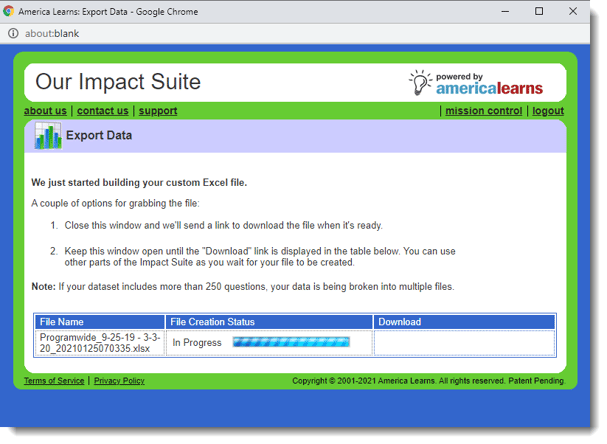
Keep the window open until the file is ready, or close the window and wait for a download link to show up via e-mail.
Matrix TrueView
Matrix TrueView worksheets present matrix data as it was entered by your reporters.
Each Matrix question included in your selected data will create it's own worksheet.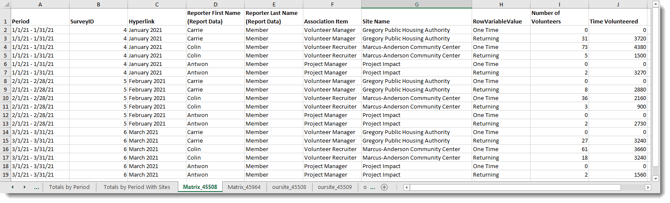
Raw Data
For Raw Report Data, select which metadata to include from the Available Columns table (see this article for definitions of each column variable), using the down arrow to place each column type in the Selected Columns table.
In the Selected Columns table, on the right, use the up/down buttons to set the order in which the columns will be displayed in your export file.
***Use the checkbox to Include quantitative & time series data with zero values.
Save this Export Option As...
The Save this export option as section allows you decide who these options should be available to (Just you; All admins with access to this section, or You and admins by role).
Additionally, you can make Saved Export Options available in other reports: Site, Program-wide, Association, and Group Reports.
Included Worksheets
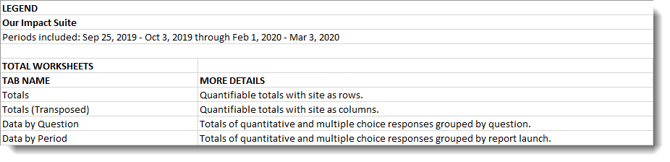
A Legend, which includes definitions of each worksheet type.