
Walkthrough
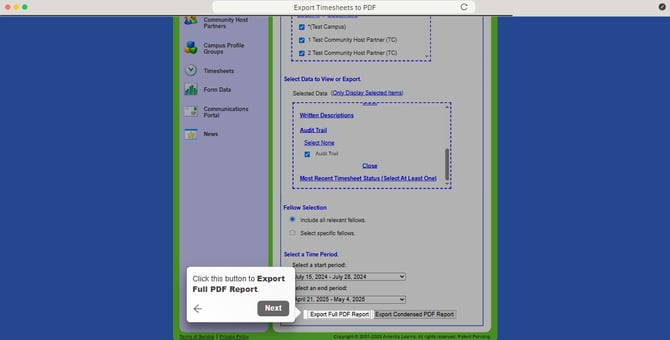
Export Timesheets to PDF
- In your Mission Control, select Timesheets.
- On the right, under Community Host Partner & Program-wide Data, select View community host partner data.
- Select Export Printable Sheets, and click Select All.
- Select Time Allocation Categories, and click Select All.
- Select Audit Trail, and click Select All.
- On the Select a Time Period section, click the dropdown menu for Select a start period, (i.e. July 15, 2024 - July 28, 2024).
- Click the button Export Full PDF Report, and then click Close. (The report will be emailed to you when it's done.)
- Click the button Export Condensed PDF Report. (Use this report if you plan to print the report.), and then click Close. (The report will be emailed to you when it's done.)