

Create Community Host Partners and Profiles (Part 1)
This allows Fellows to be assigned to their Community Host Partners.
Begin by logging into the Fellow Impact Suite.
- On the left, in your Mission Control, click Fellows, Staff, & Community Host Partners.
- On the right, under Manage Community Host Partners, select Manage community host partners & campuses.
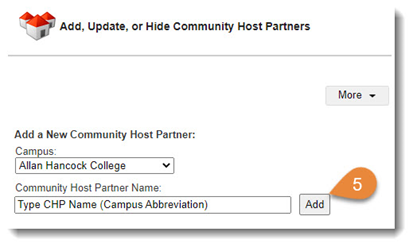
- At the top, select the radio button Add a New Community Host Partner and find your campus from the drop-down menu.
- Type the name of the host partner (use the organization's specific full name + the abbreviation for your Campus).
Example: The People's Food Pantry of Marshall County (AHC) - Click Add.
- Repeat for each new Community Host Partner.