
This is the main resource page for Campus Admins.
Site Structure, Vocab, and Roles
College Corps uses two America Learns Impact Suites: College Corps (Fellows) and College Corps (Partners).
America Learns supports an entire network of AmeriCorps and non-profit organizations all over the country, each using different language to describe their service experience. Because of this, America Learns has adopted generic, overarching terms to describe these roles in the Impact Suite.
Here's guidance on search term utilization when seeking a solution in the America Learns Support Center powered by Freshdesk.
To make this easier to navigate, we've added a table below with a list of core terms your College Corps team utilizes in both the Partner and Fellow Impact Suites. To the right of that, we've added the generic term we use in the America Learns FreshDesk Articles.
The Fellow Site is the webspace where your Fellows will interact with the system to complete a profile, timesheets, and reports. This is the space where you and your Community Host Partner Supervisors will manage Fellows.
| College Corps Term | Staff Role | FreshDesk Equivalent | Further Description |
| Fellows | N/A | Reporter | "Reporter" is the generic term for the person providing data within that Impact Suite. On this site, the Fellow completes profile data, timesheets (at regular increments), and forms (at various times throughout the year). |
| Campus Lead and/or Admin | *CAMPUSES: Campus Admin OR *CAMPUSES: Campus Admin - Communications Off |
Staff | Person in the Impact Suite responsible for entering campus and community host partner profiles, community host sites, community host site supervisors, and fellows. They are also responsible for the day-to-day management of America Learns and compliance. |
| Campus Support Staff | *CAMPUSES: Campus Support Staff - Communications Off OR *CAMPUSES: Campus Support Staff - Communications On |
Staff | Person in the Impact Suite responsible for supporting the Campus Lead and/or Admin. |
| Community Host Supervisor | **COMMUNITY HOST PARTNER: Host Site Supervisor | Supervisor | Person in the Impact Suite responsible for potentially signing off on Fellow documents and timesheets. Direct supervisor of the Fellow. |
| Community Host Partners | N/A | Sites | The physical location where the Fellows are serving. |
| Campuses | N/A | Cohorts | Cohorts are simply a way to further group your fellows for visibility. In this case, you've grouped by campus. |
Partner Site
The Partner Site is the webspace where your Campus will enter required performance and progress data throughout the year.
| College Corps Term | Staff Role | FreshDesk Equivalent | Description |
| Campus Lead and/or Admin | N/A | Reporter | "Reporter" is the generic term for the person providing data within that Impact Suite. In this sense, the Campus Admin reports recruitment data, Community Host Partner data, and other reporting needs as needed. |
| CV Staff | Various | Staff |
Pre-Service Checklist
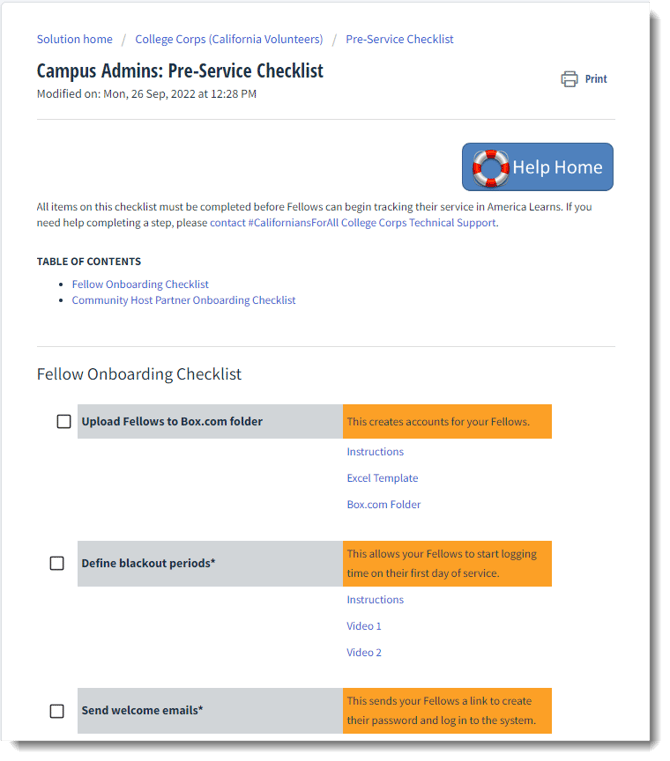
Use the Pre-Service Checklist for all of the tasks you'll need to perform before your Fellows begin service.
This checklist includes items like:
- Community Host Partner Onboarding
- Create New Community Host Partner sites
- Create accounts for Community Host Partner supervisors
- Archiving Community Host Partner Accounts
- Fellow Onboarding Tasks
- Processes to enroll Fellows
- Define blackout periods
- Send welcome emails
- Assign Fellows to Community Host Partners
- Caring for Fellows who exit the program early

You will be able to navigate back to this resource by using this button found in other articles.
Training Resources
Use these resources to train your Fellows and Community Host Partners on how to use America Learns.
Train Fellows to Use America Learns
- Training Materials: PowerPoint Deck
- Video: Overview of Timesheets for Campus Admins
- Resource Link: Resources for Fellows
- Videos for Fellows:
Train Community Host Partners to Use America Learns
- Training Materials: PowerPoint Deck
- Resource Link: Resources for Community Host Partner Supervisors
- Videos for Community Host Partners:
Common Tasks for Campus Admin
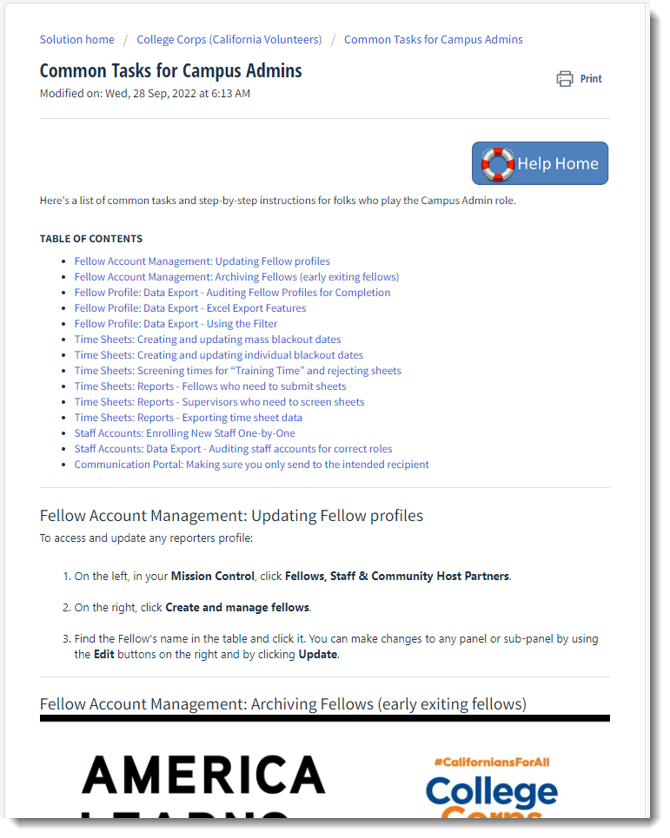
Access step-by-step instructions for common tasks for Campus Admins, including:
- Fellow Account Management: Updating Fellow profiles
- Fellow Account Management: Archiving Fellows (early exiting fellows)
- Fellow Profile: Data Export - Auditing Fellow Profiles for completion, running reports, exporting to Excel
- Timesheets: Creating and updating blackout dates
- Timesheets: Screening times for “Training Time” and rejecting sheets
- Timesheets: Reports - Fellows who need to submit sheets
- Timesheets: Reports - Supervisors who need to screen sheets
- Timesheets: Reports - Exporting timesheet data
- Staff Accounts: Create new staff accounts (one-by-one, uploads)
- Staff Accounts: Data Export - Auditing staff accounts for correct roles
- Communication Portal: Making sure you only send to the intended recipient
You will be able to navigate back to this resource by using this button found in other articles.
Frequently Asked Questions
Access frequently asked questions and answers from the California Volunteers College Corps team, including:
- My upload of staff or community host partners failed/I received an error message to upload a valid Excel template.
- I am missing the option to add Fellows to the site. How can I add new Fellows?
- I enrolled my Community Host Partners but they don’t have accounts. What’s next?
- I can’t edit the Excel template you provided.
- My staff member is not connected to a certain Fellow or Community Host Partner.
- I received an error that says PROGRAMPATH undefined.
- I am receiving emails from America Learns, but I never created an account. How do I log in?
- I am no longer enrolled in the program. How can I stop receiving emails?
You will be able to navigate back to this resource by using this button found in other
articles.