Once you’ve completed the rest of the Finish Line Implementation Checklist, you’re ready to see how your reporters are progressing.
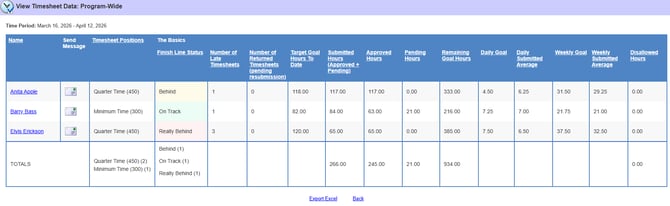
The quickest way to get a snapshot of how everyone assigned to a Timesheet Template with Finish Line Status enabled is doing is to run a Totals Timesheet Report.
Here’s how:
-
In Mission Control, navigate to Timesheets.
- Select Program-wide data.
NOTE: If you only have access to Site data, you can follow these same steps to generate a report for the Sites you can view.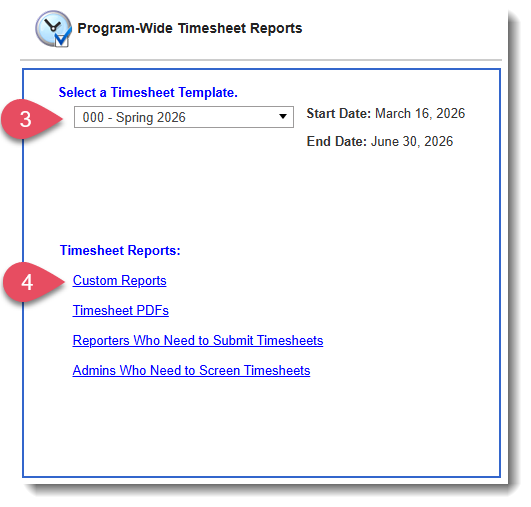
- Select the Timesheet Template you'd like to generate a report for.
- Click Custom Reports.
- Choose Totals Report under Report Type.
- Click Select Timesheet Data.
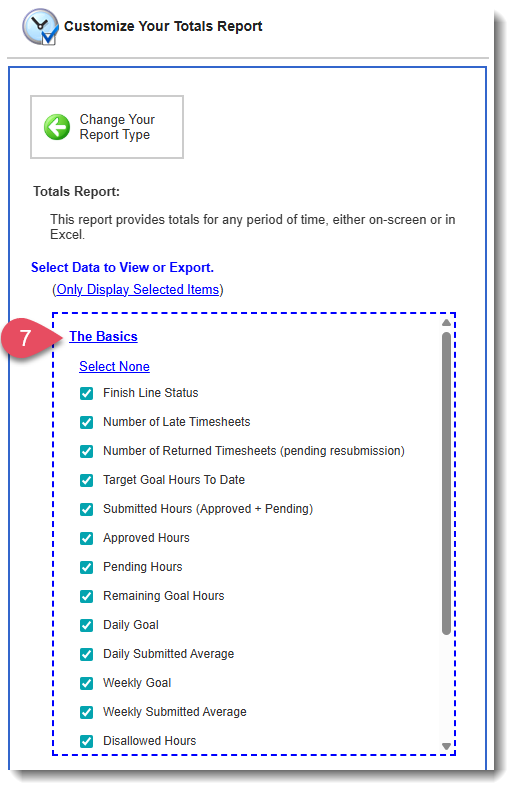
- On this page, you can choose exactly which data points to include in your report. We recommend selecting all of the stats under The Basics to get a clear snapshot of how reporters are doing. You can then add any additional stats you need.
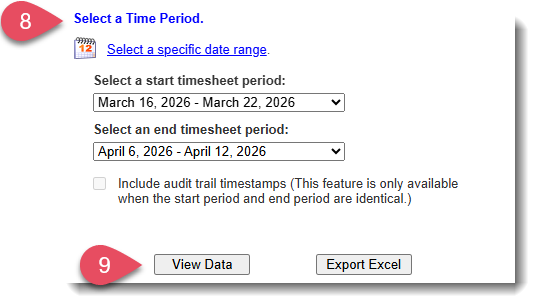
- Under Select a Time Period, choose the earliest and latest available timesheet periods so you can see a complete, program-to-date picture of where reporters stand with their timesheet data.
-
Select View Data or Export Excel to generate your report.
Here’s a sample of what that report can look like: