Cancelling Timesheet Edit Requests
To remove an edit request, simply find the reporter in question and access their Timesheet dashboard.
- On the left, in your Mission Control, click Reporters, Admins, & Sites.
- On the right, click Manage reporter accounts.
- Click the relevant reporter’s name.
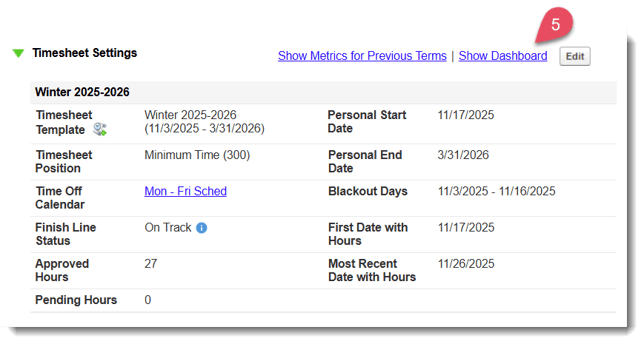
- Open the Timesheet Settings panel.
- Click the Show Dashboard link.
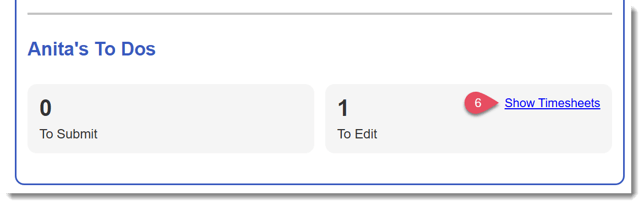
- When the dashboard opens, find the section under Reporter's To Dos with timesheets labeled To Edit and click Show Timesheets.
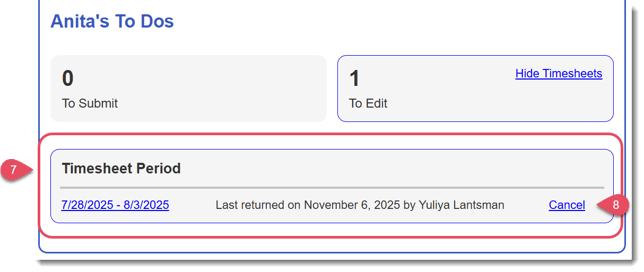
- Below, any timesheets that have been rejected for edits will appear with the date returned listed.
- To cancel the edit request, click the Cancel link.
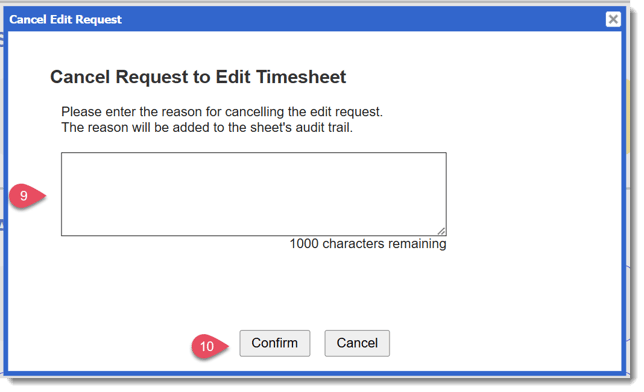
- A window will appear where you will enter the reason for cancelling this edit request.
NOTE: Your reason for cancelling the edit request will appear in the Audit Trail. - Click Confirm.