
Admin-First Signing Orders
We’ve heard from many programs—especially AmeriCorps clients—that sometimes admin need to sign documents first before they’re sent to reporters. Whether it’s entering start dates, site details, or slot types, some forms simply need to begin with your leadership team.
Now, you can choose from a full suite of Admin-First Signing Orders to match your process exactly—no more workarounds!
What Are Admin-First Signing Orders?
These flows begin with your Directors or Site Supervisors before a reporter is asked to sign. They’re perfect for documents like:
-
Reporter Service Agreements
-
Mid-Term & End-Term Evaluations
-
Any form where admin complete data or approvals first
All Available Admin-First Orders
| Signing Order | Description |
|---|---|
| Site Supervisors → Reporters | Supervisor completes and signs first; then reporter completes and signs. |
| Site Supervisors → Reporters → Directors | Supervisor begins; reporter signs next; Director finalizes. |
| Site Supervisors → Directors → Reporters | Supervisor starts; Director signs next; reporter finishes. |
| Directors → Reporters | Director completes first; reporter follows. |
| Directors → Site Supervisors → Reporters | Director leads; supervisor signs second; reporter wraps up. |
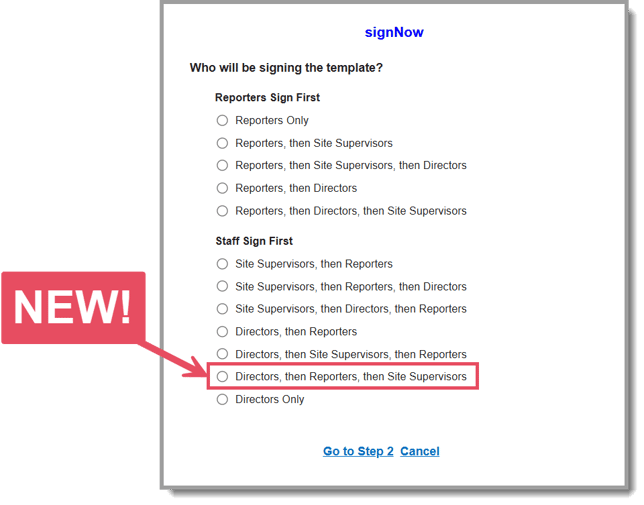
| NEW: Directors → Reporters → Site Supervisors | Director begins with initial data and signature, reporter completes and signs next, and the supervisor finishes with final review and sign-off. |
| Directors Only | Director is the only signer—great for admin-only documents. |
How to Set It Up
-
On the left in your Mission Control, click Reporters, Admins, & Sites.
-
On the right, click Manage reporter accounts.
-
On the right, in the More dropdown, choose Manage Fields and Profile Layout.
-
If you need to create a new field, on the right, click Create a Field. (More help here.)
-
Once created, click either Add Signing Fields and Assign Signers or Upload Your First Template (dependent on the field settings).
-
Log in to SignNow and then click Go to Step 1.
-
In Step 1, choose your preferred signing order.
-
Follow the steps to upload your document and add signing fields for each role.
That’s it! Once configured, your document will follow the exact order you’ve selected—keeping your process clean, accurate, and effortless.
More About Setting Admin Permissions
Need help deciding who can use which flow? Check out this article for permission setup and best practices.